
How I Used “Code Quality” to Sneak Accessibility Into Sprint Planning#
Back in the late 2000s, during the early days of my test contracting career, getting accessibility issues taken seriously was an uphill battle.
While engineering managers would often handwave a requirement that a website should “meet WCAG standards” as part of our testing remit, very few had the appetite to prioritize those issues when discovered. Without fail, accessibility tickets were the absolute first to be parked or de-prioritized during Sprint planning.
So, I adapted my strategy.
Instead of filing tickets labeled “Accessibility Defect,” I began reporting them as Code Quality Issues.
I was using early automated tooling like WAVE WAVE (by WebAIM) and early JavaScript linters. By reframing semantic HTML errors, missing labels, and broken tag structures as technical debt or structural code flaws, the issues were suddenly treated with urgency. The natural byproduct of fixing bad code? Accessibility improved exponentially.
Moving Beyond the “Code Quality” Trick#
Using the “Code Quality” label was a highly effective tactical workaround, but it wasn’t a permanent solution. As projects scaled and development methodologies matured, maintaining this workaround became a stepping stone to a much more structured approach.
The transition from sneaking these defects under the radar to getting dedicated accessibility items on the standard backlog happened through three distinct phases:
Leveraging the Data: By using tools like WAVE, JavaScript linters, and early automated checkers, I wasn’t just finding errors, I was gathering measurable metrics. When pulling up a dashboard that showed hundreds of missing labels, broken semantic tags, or keyboard traps, it became clear to leadership that these weren’t isolated, subjective bugs. They were systematic code failures that increased overall technical debt.
Connecting Quality to Cost: To get these issues treated as distinct backlog items, I had to change the conversation with product owners and stakeholders. I stopped talking purely about compliance and started talking about project risk. Showing how a code quality issue directly caused a broken user flow or a functional drop-off for a portion of our users made the business case clear. Fixing it during development was cheap; fixing it post-release after a user complaint was incredibly expensive.
The Maturity Shift: Eventually, the industry began to shift. As accessibility guidelines became clearer and tooling became more integrated into the developer workflow, project managers could no longer relegate accessibility to the “nice-to-have” pile. The conversation evolved from “Why are we fixing this code error?” to “How do we make sure this doesn’t get into production?”
By the time accessibility requirements earned their own permanent, non-negotiable place on project backlogs, the foundation had already been laid. The automated tools we used hadn’t just helped us fix the code, they had provided the objective evidence needed to shift the engineering culture.
The Tool Is Not the Entire Story#
Of course, automated checkers are never the end of the accessibility story. You cannot validate a digital experience without actually traversing websites or applications using assistive technologies.
However, what automated checkers do capture is the foundational layer. Alarmingly, even today in 2026, I am still uncovering the exact same fundamental issues on production systems:
- Avoidable keyboard traps
- Insufficient color contrast ratios
- Missing or broken form field labeling
Catching these errors efficiently is the true value of automated checkers. They should never be used to rubber-stamp compliance (and hopefully, the industry has evolved past the days of relying solely on a Lighthouse score to validate a frontend!).
Instead, they should serve as your first line of defense. To understand how we arrived at our current ecosystem of testing, it helps to look at how these tools evolved over the last three decades.
The Evolution of Open-Source Accessibility Tools#
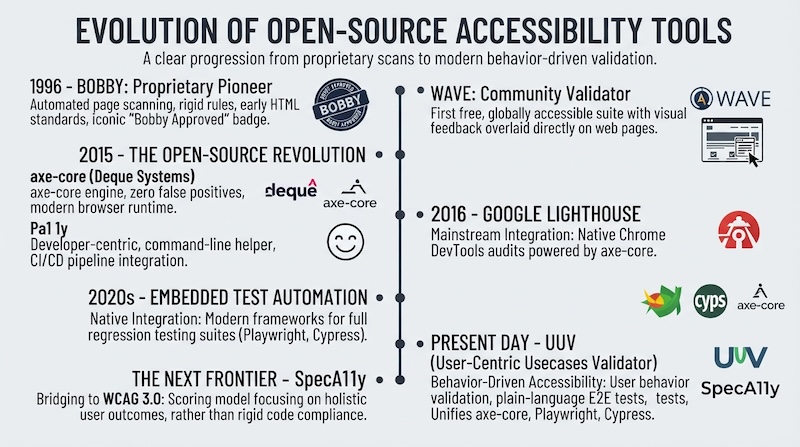
1996 – The Proprietary Pioneer: Bobby#
Developed by the Center for Applied Special Technology (CAST), Bobby introduced the industry to automated page scanning. It relied on rigid, hardcoded rule sets tailored to early HTML standards. Bobby analyzed web pages for fundamental accessibility barriers and readability by screen readers, becoming widely recognized for its iconic “Bobby Approved” visual badges.
2001 – The Community Validator: WAVE#
The Web Accessibility Evaluation Tool (WAVE) was launched by WebAIM. While its core underlying engine was not completely open-source, it became the first free, globally accessible suite to provide visual accessibility feedback overlaid directly onto web pages.
2015 – The Open-Source Revolution: axe-core & Pa11y#
- axe-core (Deque Systems): Deque open-sourced the axe-core engine, which rapidly became the global industry standard. It fundamentally changed automated testing by committing to a “zero false positives” philosophy and running directly within modern browser execution environments.
- Pa11y: Emerging as a completely open-source, developer-centric command-line helper, Pa11y allowed engineering teams to easily integrate accessibility checks directly into continuous integration and deployment (CI/CD) pipelines.
2016 – Mainstream Integration: Google Lighthouse#
Google embedded automated accessibility audits directly into Chrome DevTools via Lighthouse. Crucially, Google chose to power these audits using Deque’s open-source axe-core engine, instantly placing automated accessibility infrastructure into the hands of billions of web users and developers.
2020s – Embedded Test Automation#
Modern web automation frameworks natively integrated automated accessibility checks. Extensions like @axe-core/playwright and cypress-axe allowed frontend developers to execute accessibility rules seamlessly during end-to-end (E2E) regression testing suites rather than running post-build scans.
Present Day – Behavior-Driven Accessibility: UUV#
The open-source ecosystem UUV (User-Centric Usecases Validator) shifted testing from isolated technical code reviews to User Behavior Validation. Backed by engineering organizations like Orange Open Source, UUV utilizes Cucumber to let developers and product stakeholders write E2E tests in plain language. By unifying tools like axe-core, Playwright, and Cypress, it executes checks based on how an actual human utilizing assistive technologies interacts with a browser.
The Next Frontier – SpecA11y & WCAG 3.0#
As digital accessibility prepares for the architectural transition from WCAG 2.x to WCAG 3.0 (the W3C Accessibility Guidelines), SpecA11y has emerged to bridge the gap. While legacy engines remain tethered to the binary pass/fail checkboxes of the past, SpecA11y introduces early native support for the upcoming WCAG 3.0 scoring model, focusing on holistic user outcomes rather than rigid code compliance.